

Action Scheduler Cleaner, explained
Do unnecessary scheduled actions slow down your WordPress site?
Are you experiencing performance issues due to a cluttered database filled with expired or completed tasks?
The Action Scheduler Cleaner plugin is here to save the day!
With wp-crons, instant cleaning tools and more, this is a robust solution to fix your scheduled action woes.
Why Action Scheduler Cleaner?
No complex configurations or technical know-how is required. Action Scheduler Cleaner works silently in the background, keeping your database clean and your site running smoothly.
Who is it for?
Anyone running a WordPress website that requires the Action Scheduler will benefit from this tool. The Event Calendar, Fluent CRM and WooCommerce all use this tool and can end up with very large logs. Keeping your logs reduced and database small will improve the site speed and also your database smaller to save on hosting costs.
Cron Option Settings
Set a daily or weekly cron to clear your tasks.
Sometimes you need a dedicated background task for clearing your logs. This is a common requirement when background scheduled actions do not run often enough to clear your logs.
Version 1.2.0 introduces our new cron management panel.
Navigate to Tools > Cron Log Cleaner in your WordPress admin panel.
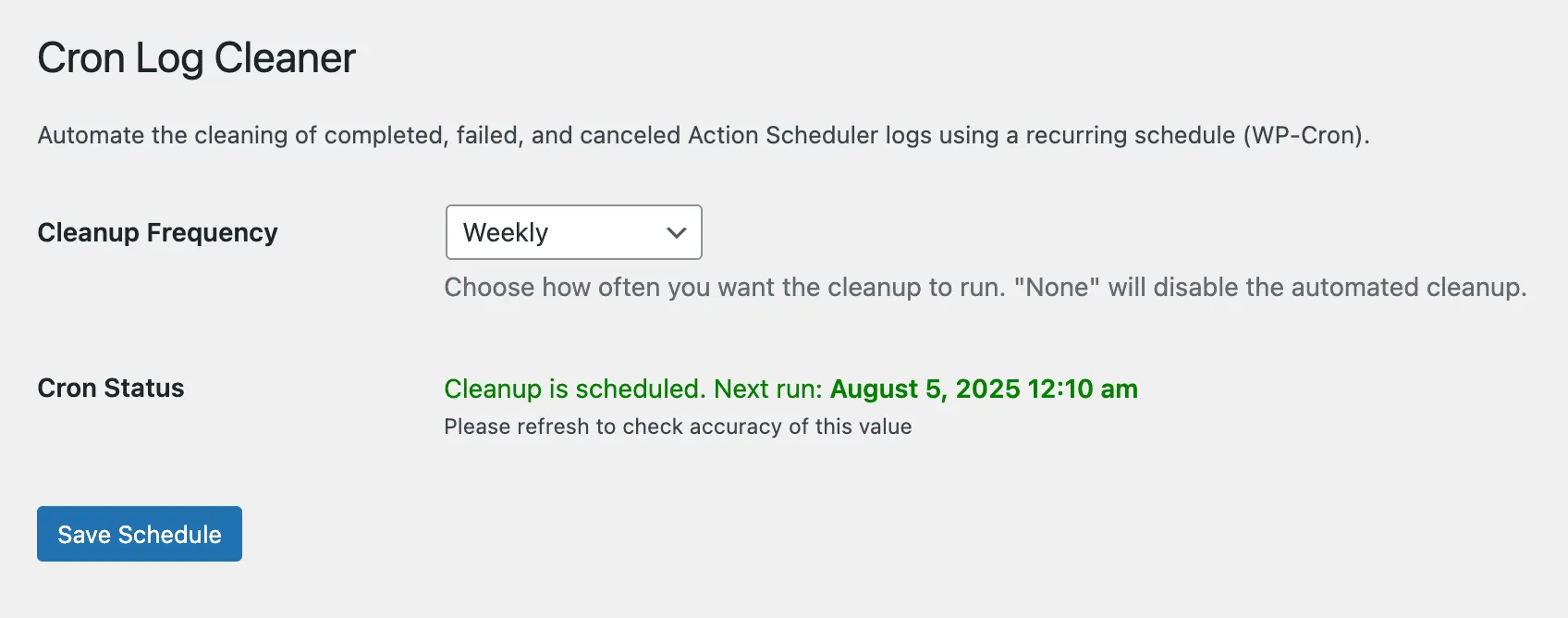
1. Cleanup Frequency
How often do you need to clear your scheduled action logs?
We have either a daily or weekly option.
We recommend using the weekly option to reduce log size inside your database.
2. Cron Status
This is a check to make sure your Cron has been scheduled.
A refresh can be required to check that this is showing the correct data.
3. Save Schedule
Save your options and a cron is created to clear your database.
If you are using a great dedicated WordPress Hosting environment like WP Engine, you should make sure you are using the dedicated background processing for WP Cron.
Plugin Settings
Configuring the Action Schedule Cleaner
Fine-tune the cleanup process to suit your specific needs and preferences. Action Scheduler Cleaner offers customization options to tailor the cleanup process to your specific needs. You can set automated cleanup schedules, increase concurrent batches, and adjust other settings.
Navigate to Tools > Action Scheduler Cleaner in your WordPress admin panel.
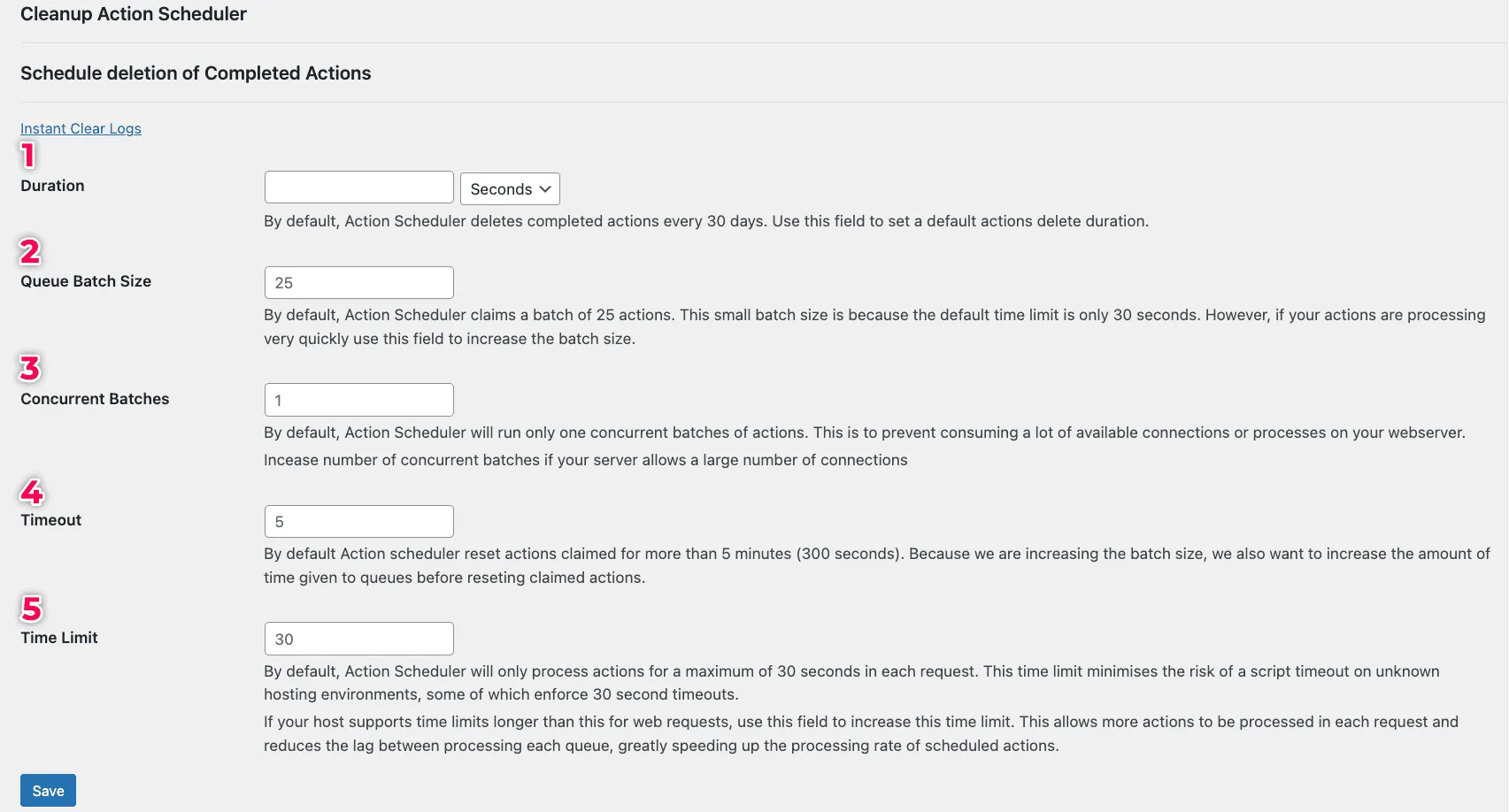
1. Easy access to storage duration
How long do you need to store your scheduled action logs?
By default, scheduled actions are deleted after 30 days. This means your logs accumulate every month and are cleared by action scheduler after 30 days.
With Action Scheduler Cleaner you can edit this duration to any figure you like with our settings panel.
We recommend changing the storage duration to 7 days to reduce log size inside your database.
2. Manage Batch Size
The Queue Batch Size setting determines the number of actions processed in each batch.
When a scheduled action is initiated, this is processed in batches to optimize performance and prevent resource overload.
Larger batch size can potentially speed up the process but may also increase server resource usage. Conversely, a smaller batch size reduces resource usage but may prolong the cleanup duration.
We recommend a Queue Batch Size at the default value of 25 actions.
3. Concurrent Batches
Concurrent Batches refers to the number of batches the action scheduler can run simultaneously.
The Concurrent Batches setting allows you to specify the maximum number of batches that can run simultaneously.
Increasing the number of concurrent batches can accelerate scheduled actions by processing more actions concurrently. However, it's essential to consider server capacity and resource constraints to avoid overloading the server.
You can set the Concurrent Batches value to 2 batches.
4. Timeout
The Timeout setting defines the maximum duration for processing each cleanup batch.
Scheduled actions are subject to a timeout period, which limits the time allocated for processing actions within each batch. If a batch exceeds the specified timeout duration, it is terminated to prevent prolonged execution.
The Timeout setting helps prevent cleanup tasks from consuming excessive server resources or causing performance issues.
Adjusting the timeout duration allows you to balance procession efficiency with server resource utilization.
For a safe Timeout, set this value to 5 minutes.
5. Time Limit
This is the maximum time the action scheduler takes to process actions in seconds.
Unlike the Timeout setting, which applies to individual cleanup batches, the Time Limit setting governs the overall duration of the scheduled action. If an action surpasses the specified time limit, the entire process is terminated to avoid prolonged execution.
Setting a time limit helps ensure that cleanup tasks are completed within a reasonable timeframe, preventing potential disruptions to site performance and server stability.
If you are using a great dedicated WordPress Hosting environment like WP Engine, you can increase the Time Limit to 60 seconds, else you can leave the default value of 30 seconds.
Instant Clean Options
Get your Action Scheduler cleaned out done fast in a stable way.
To clean out your completed or failed logs quickly use the Fast Clear Option.
Navigate to Tools > Fast Clear Logs in your WordPress admin panel.
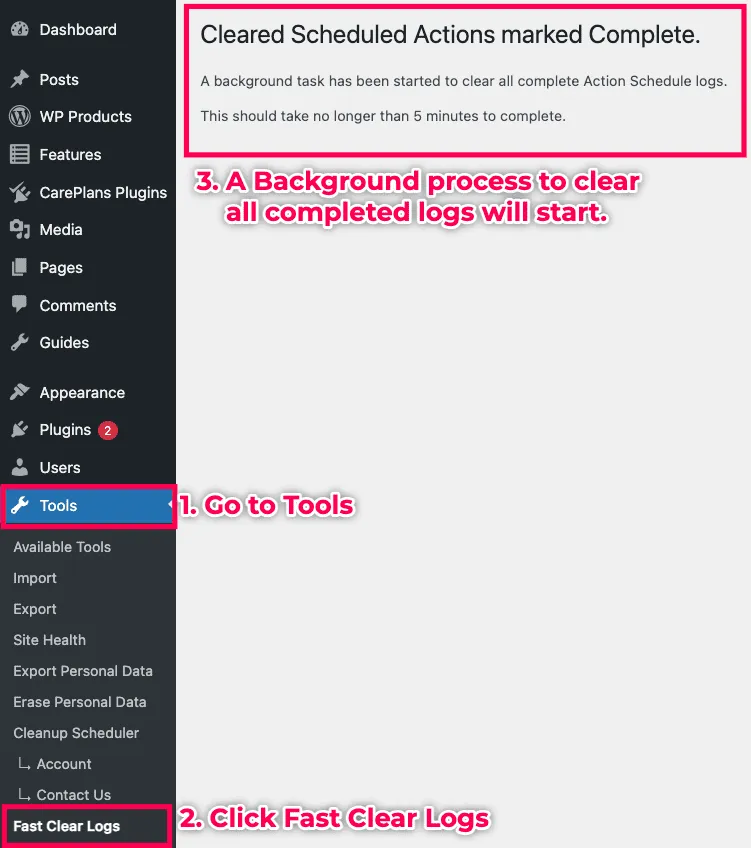
1. Fastest Way to clear your Actions
This option creates background schedules to clear your logs. It happens instantly and gives a time estimate for how long it will take for your schedule to run.
2. How is the time determined?
Most websites will delete 10,000 entries per minute. We base the estimated time on that. Depending on your setup and running crons every 1 minute you should get an accurate result.
3. What if the fast clear doesn't work?
If this doesnt give you a rapid result, use the cron option as this is an independent workflow.
Please note: We recommend using a dedicated WordPress host like WP Staq, Cloudways, WP Engine, Stella sites or WPMU Hosting to get the best results for your WordPress site.
See it in action
Before and after
Database size: 457 MB before, 10.4 MB after, down 97.7%.
Log Entries: 5,000,000 Rows before, 50 Rows after, down 99.9%.
Measured . We checked the database before and after on our client site, https://www.thinklocal.com.au. This clean up fixed the log entries and kept them clean moving forward.
What it does
Cleanup
Cleanup your old logs and make your database run faster on a schedule.
Cron Management
Options to have a dedicated cron are available to ensure logs clear.
Rapid Cleanup
You can rapidly cleanup your logs without risking a crash or orphaned database entries.
Automatic scheduling. Regular cleanups.
Once installed you can set ongoing schedules to see your Action Scheduler kept in check.
Plans & Pricing
Straightforward licensing with instant access and updates.
5 Sites
For those managing a small business.
- 5 Site License
- Email Support
- Security Support
- Automated Updates
Single Site
For a single WordPress Site Cleanup.
- 1 Site License
- Email Support
- Automated Updates
- Security Support
Secure checkout by Freemius. Prices in USD, billed yearly.
Technical specifications
- Type
- WordPress Plugin
- Category
- Performance & Database
- Version
- 1.2.1
- WordPress
- 5.0 or higher
- PHP
- 8.1 to 8.5.12
- Tested up to
- WordPress 7.1.4
- Licence
- GPLv2
- Price
- From $9.50 / yr
Works with
- WordPress
- WooCommerce
- The Events Calendar
Frequently Asked Questions
What is Action Scheduler Cleaner?
Action Scheduler Cleaner is a WordPress plugin that allows you to clean up expired or completed actions, thereby improving performance and database efficiency.
How does Action Scheduler Cleaner benefit my site?
By regularly cleaning up unnecessary scheduled actions, Action Scheduler Cleaner helps optimize your WordPress site's performance by reducing database bloat. This leads to faster loading times, improved user experience, and smoother site operation.
Can I customize the cleanup process?
Action Scheduler Cleaner offers customization options to tailor the cleanup process to your specific needs. You can choose which types of actions to clean up, set automated cleanup schedules, and adjust settings according to your preferences.
Will using Action Scheduler Cleaner affect my site's functionality?
No, Action Scheduler Cleaner is designed to work seamlessly with your WordPress site without causing any disruptions. It safely cleans up expired or completed actions while ensuring that your site continues to function smoothly.
Are there any hosts that are know to have Schedule Action problems?
In my experience Site Ground hosting has a very limited cron schedule. This is set to 10 mins. Having a cron run every 10 mins is a big hindrance to anyone using WordPress. It also stops the action scheduler and action scheduler cleaner working properly. If you are with Siteground I would have to recommend an alternative host. Try InstaWP, WP Engine, Chemicloud or Spinup WP. You can thank me later.
Does the plugin clean all tables associated with the Scheduled Actions?
Yes. Unlike some of the other plugins available our plugin cleans the main table, logs and claims to ensure your database gets the proper performance benefits.
Do you have a custom cron?
Yes, we have a custom cron job that can be used to clear your logs in an independent background process on either a weekly or daily task. This is great when you find your Scheduled actions are growing fast and the standard way of processing your logs is getting blocked by the Action Scheduler.
Related Articles and Videos

How to Use the Action Scheduler Cleaner
Learn how to use the Action Scheduler Cleaner plugin to clear scheduled action logs to optimise your site’s performance. Watch the tutorial!

How To Clear Scheduled Action Logs in WordPress
Do you want to know how to clear scheduled action logs for your WordPress website? Scheduled actions are a powerful plugin feature of WordPress that allows you to automate tasks. The action scheduler plugin will run these tasks or actions in the background. These task can including sending emails, publishing posts, and updating products. Why…